Include global CSS/SCSS files
Problem
When installing 3rd party modules there might be a use case where the styles of a module are not bundled with it and have to be included manually. Another use case would be if you want to use global styles on purpose.
By default, a new Archibald project is using CSS Modules. This means when importing global CSS/SCSS files or CSS/SCSS files of a 3rd party module in e.g. component SCSS file, not only component SCSS will run through CSS Modules mechanism but also CSS/SCSS of the 3rd party module or global CSS/SCSS. As a result the styles of a 3rd party/global CSS/SCSS/ won't be usable.
Solution
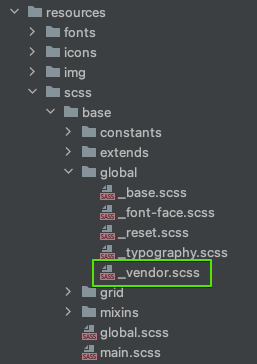
To bypass the CSS Modules mechanism, CSS/SCSS files have to be included in src/shop/resources/scss/base/global.scss. For new Archibald projects generated with npm init @archibald command, there is a file that can be used for managing 3rd party CSS/SCSS imports. The usage of this file is not mandatory.
SCSS file src/shop/resources/scss/base/global/_vendor.scss for managing 3rd party CSS/SCSS:
SCSS file include in src/shop/resources/scss/base/global.scss:
// other imports

@use 'shop/resources/scss/base/global/vendor';